
Build vs. buy
What a custom B2B wholesale ordering portal actually costs
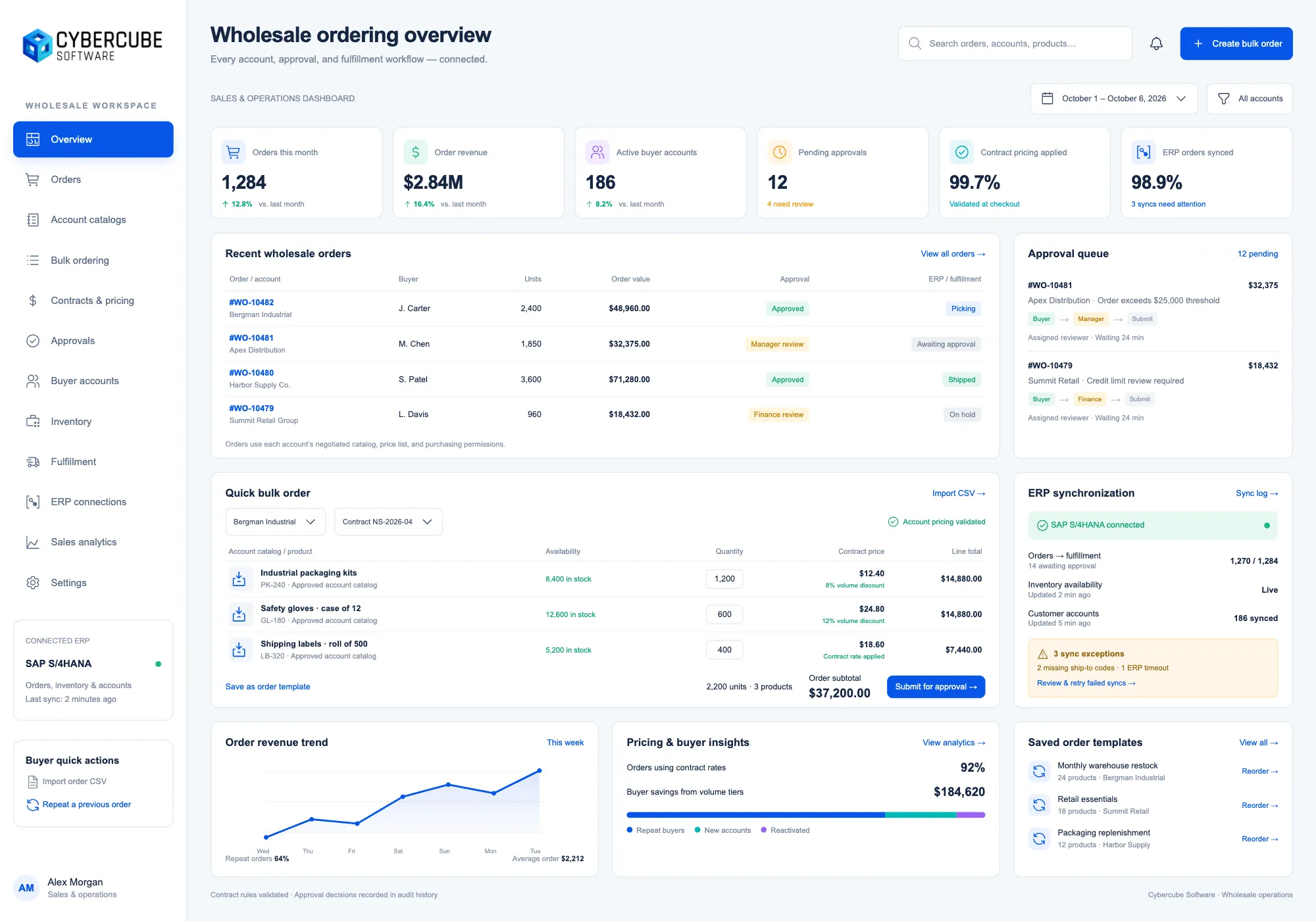
"How much does it cost to build our own ordering portal?" is the question every growing distributor eventually asks — usually right after a big customer asks for something their current system can't do, or after the third month of re-keying orders out of email and into the ERP by hand.
The honest answer is a range, not a number: most custom B2B wholesale portals land between $45,000 and $150,000 for a first production version, and the spread is almost entirely about scope. That's a wide band, so the useful thing isn't the average — it's knowing which decisions move you from one end of it to the other.
Where the money actually goes
A wholesale portal is rarely expensive because of the storefront. The catalog, the cart, and the order form are the cheap part. The cost lives in the four things that make it yours:
1. Pricing logic. Consumer e-commerce has one price per product. Wholesale has customer-specific contract pricing, volume breaks, tiered discounts, promotional overrides, and rules about who sees what. Modelling that correctly — and making it maintainable by your team, not just your developer — is often the single biggest line item. If your pricing fits in a simple table, you're at the low end. If it takes a spreadsheet and a phone call to explain, you're not.
2. ERP and inventory integration. A portal that can't see real stock levels or write orders back into your ERP just moves the re-keying problem around. Real integration — live inventory, order sync, customer and pricing data flowing both ways — is where a build earns its keep, and it's also where estimates go wrong. The portal is predictable; the ERP's quirks are not. Budget honestly for the integration being harder than the vendor's API docs suggest.
3. Roles and approvals. B2B buying is a team sport: a purchaser drafts an order, a manager approves it over a threshold, a rep places orders on a customer's behalf, finance needs terms and credit limits enforced. Every role and approval step is real logic to design, build, and test. Two roles is cheap. Seven roles with an approval queue and spending limits is a meaningful chunk of the budget.
4. The long tail of "obviously it should." Reorder from history, saved order templates, CSV upload for big orders, back-in-stock alerts, downloadable invoices, punchout for your largest customers' procurement systems. None of these are hard on their own; together they're where a $60k project quietly becomes a $120k one. The discipline is deciding which ones you need at launch and which can wait.
Build vs. buy: where the line is
Off-the-shelf B2B platforms are genuinely good now, and for a lot of distributors they're the right call. If your pricing is straightforward, your ERP has a supported connector, and your buyers will accept a standard flow, you should probably buy — a build can't beat a mature platform on features-per-dollar in year one.
The line moves when two things are true at once: your pricing or workflow is a competitive advantage you don't want to flatten into someone else's template, and the per-seat or per-order fees keep climbing as you grow. That's the moment the five-year math flips. A platform that costs $2,500/month today costs a lot more at triple the order volume and double the seats, every year, forever. A build is a larger cheque up front and a small maintenance line after that — so the longer your horizon and the faster you're growing, the better it looks.
That trade-off is exactly what our Build vs. Buy calculator is for: put in your current software spend, your growth, and a build estimate, and it shows you the five-year total for each path and where they cross. It will tell you to keep buying when that's the honest answer.
What it looks like in practice
We built a wholesale ordering portal for a distributor who had outgrown exactly this: contract pricing that no off-the-shelf tool handled, an approval queue their larger accounts needed, and an ERP that had to stay the system of record. The result consolidated ordering, approvals, contract pricing, and live ERP sync into one portal their customers actually log into — you can see the shape of it in the B2B wholesale portal case study. The point wasn't a prettier storefront; it was removing the manual re-keying and the pricing errors that came with it.
How to keep the number sane
If you're scoping a build, three habits keep the budget honest:
- Launch the spine, not the wishlist. The core ordering loop plus your real pricing and one clean ERP integration is a product. The CSV uploader and the punchout integration are version two. Shipping the spine first means you're validating with real orders while the nice-to-haves are still cheap to cut.
- Treat the integration as its own risk. Get a developer looking at your actual ERP early, not at the API documentation. The difference between "supported" and "works the way your business uses it" is usually a few weeks of budget.
- Own what you pay for. A custom build should leave you with the code, the accounts, and the documentation in your name. If it doesn't, you've bought a subscription with extra steps.
A custom wholesale portal is a real investment, and it's the wrong move for plenty of distributors. But when your pricing is your edge and your volume is climbing, it stops being an expense and starts being the thing that stops costing you orders. The way to know which one you're looking at is to run the numbers for your own business — here's the calculator — and if you want a real figure for your scope, tell us what you're trying to build and we'll come back with one.