
Case study · AI
Workflow Copilot.
Prepares work across your tools, routes key actions for approval
We built an AI copilot that did the legwork across a business's tools — reviewing requests and preparing updates — while routing the actions that mattered to a human for approval.
Start your project →- Industry
- AI & automation
- What we built
- 3 integrated components
- Key outcome
- Human Approval on key actions
Overview
Doing the legwork, keeping the judgment.
A team handled a steady stream of repeatable requests that each meant touching several tools — reading the request, updating records, and notifying people.
They wanted the busywork automated, but were rightly nervous about AI taking consequential actions on its own.
- Repeatable work spread across several disconnected tools
- Hours lost to copying between systems
- Real risk if an action went wrong unsupervised
- A need to know what happened and undo it
The goal was to automate the preparation, but keep a human on the consequential actions.
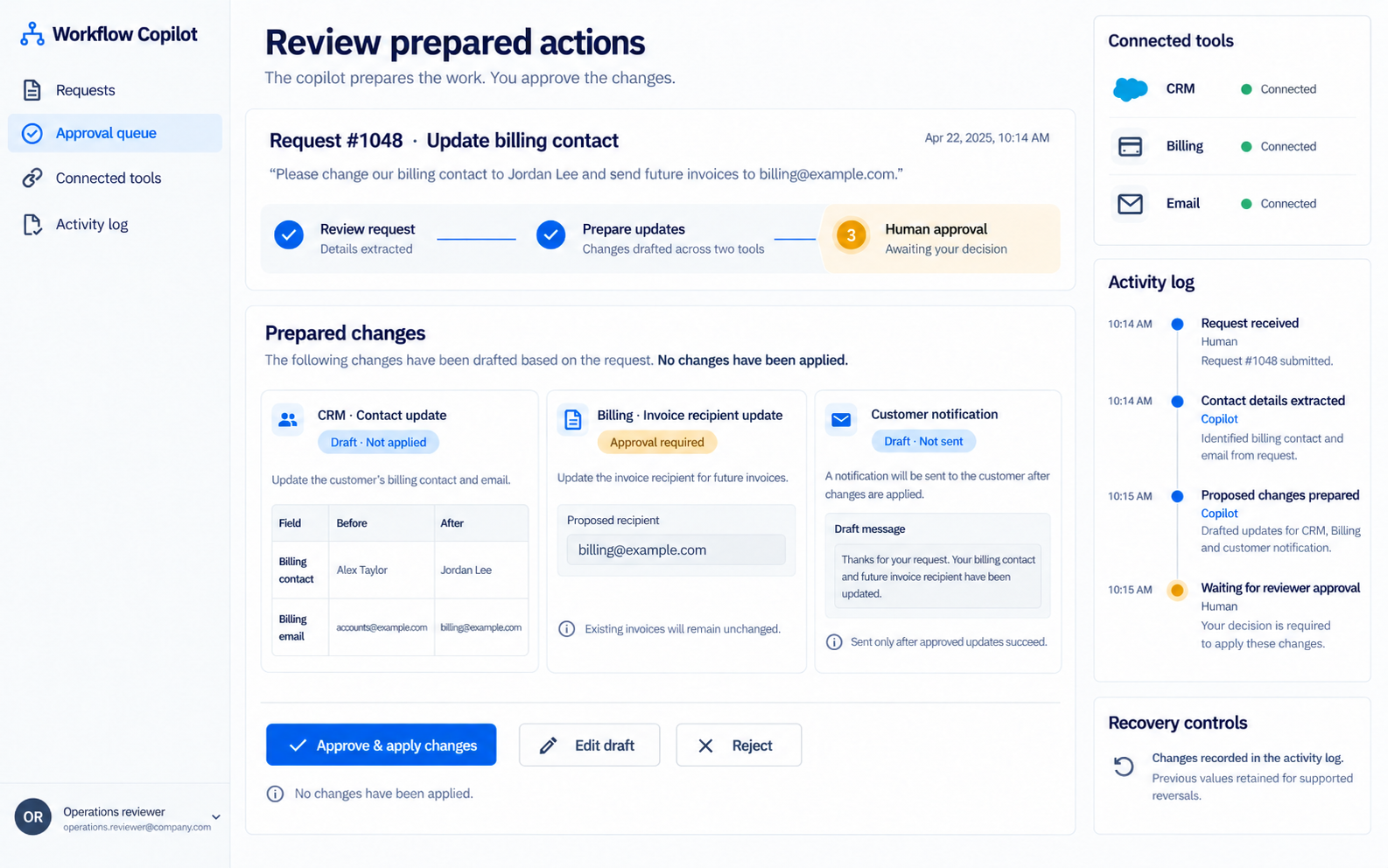
Experience flow
From a request to a reviewed action.
The solution
An agreed set of workflows, with a human in the loop.
We automated an agreed set of connected workflows — the copilot prepares the work; a person approves the actions that matter.
Core components
Automation where it's safe, approval where it counts, and a record of everything.
-
01
Connected workflows
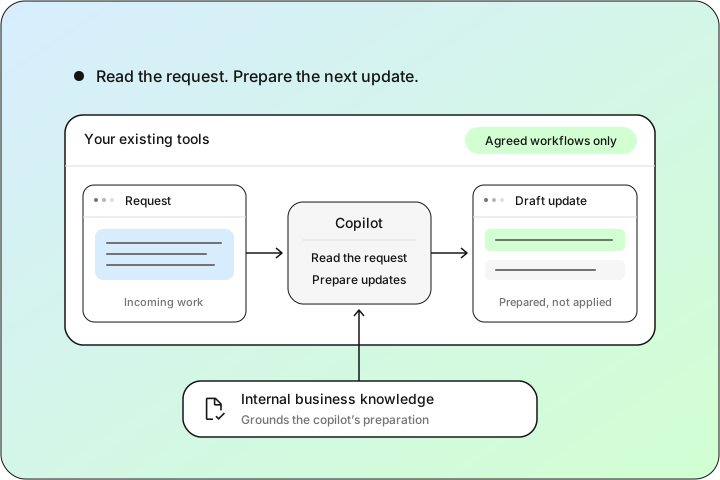
Workflows
An agreed set of workflows across the team's existing tools
The copilot reads requests and prepares the updates
Grounded in the business's internal knowledge
-
02
Approval & safeguards
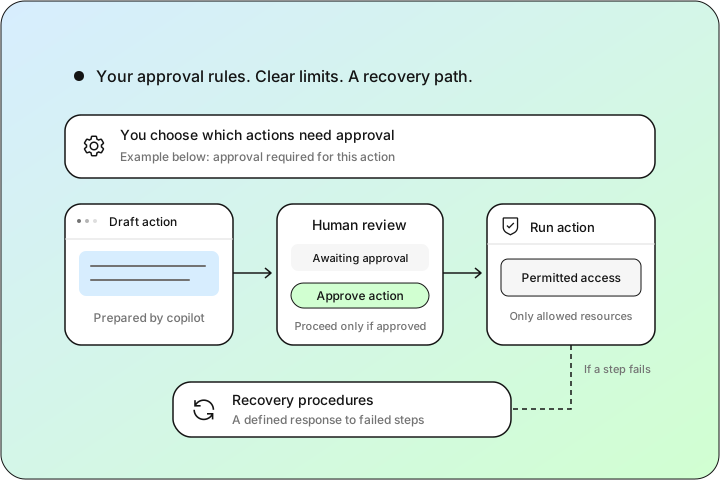
Control
You choose which actions require human approval
Access controls on what the copilot can touch
Recovery procedures when a step fails
-
03
Audit & monitoring
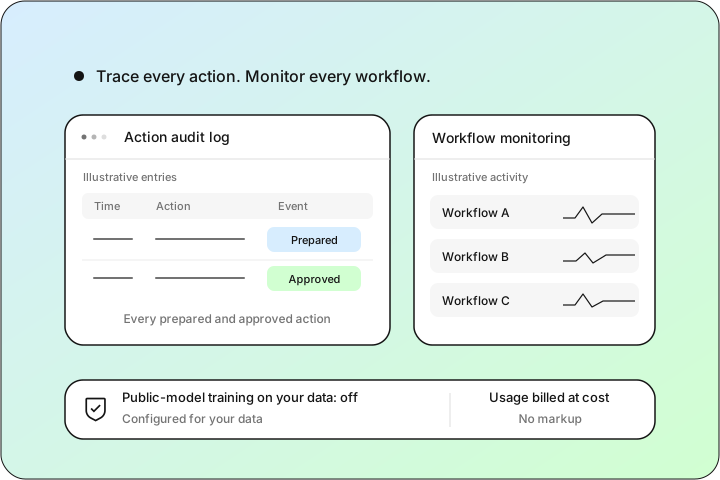
Trust
Audit logs of every prepared and approved action
Monitoring across the workflows
Configured so your data isn't used to train public models; usage billed at cost
Stack used
- Next.js
- TypeScript
- Node.js
- PostgreSQL
- Prisma
- Redis
- Python
- LangChain
- Anthropic
Implementation approach
Phased delivery.
-
01
Define the first workflows
Agreed the first set of workflows and integrations, and which actions would always require approval.
-
02
Build with controls
Built the connected workflows, the approval steps, access controls, audit logging, and recovery for failed steps.
-
03
Review and phase in
Ran a defined security review, tested normal and failure scenarios, and rolled the copilot out in phases.
Results
Outcomes at a glance.
- Human-in-the-loop
- Audited
- Recoverable
I was the person asking 'what happens when it's wrong?' in every meeting. The copilot does the preparation — reads the request, pulls up the record, drafts the update, lines up the notifications across our tools — and then it stops and waits. Every action that actually changes something needs a human click, everything it touched is in the log, and when a step fails it rolls back and says so instead of half-finishing. It does the busywork. It doesn't get the keys.
- Automated the preparation across several tools
- Kept a human on every consequential action
- Logged and monitored everything the copilot did
- Built recovery in, so a failed step didn't cause chaos
Impact & outcome
Automation with the brakes on.
We automated the legwork across a team's tools while keeping judgment where it belongs — a person approving the actions that carry consequences.
The headline wasn't speed, it was trust: approvals, audit logs, and recovery meant the team could let the copilot act without lying awake about it.
Starting with an agreed, bounded set of workflows kept the first phase safe to review — and left a clear path to add more once it had earned confidence.
Ready to automate the busywork safely?
We build AI copilots that prepare work across your tools and route the key actions for approval — audited, recoverable, phased. We'll reply within one business day — no pressure, no sales script.
Start your project →