Status and history in one view
Orders, jobs, cases, or care plans—with timelines, documents, and next steps your clients can trust without chasing your inbox.

Client-facing
One place for clients to check progress, pull their own data, and act on it—without calling or emailing your team for every update.
We build secure portals that match how you sell and deliver: contract pricing, approvals, documents, messaging, and live status—connected to the ERP, CRM, or ops tools you already depend on.
Let's talk about your portal →
Why a portal
When every question becomes a ticket or a phone call, your best people spend the day repeating answers instead of moving work forward. A portal turns routine requests into structured self-service—while you keep the rules, permissions, and audit trail your business requires.
We design for the roles that matter: buyers, patients, subscribers, partners, or end clients. Each sees only what they should, in language that matches your brand—not a generic login widget bolted onto someone else's template.
You start with the journeys that flood your inbox—order status, document requests, approvals—and expand as clients adopt. The portal grows with your accounts and integrations, not as a separate product you babysit.
Orders, jobs, cases, or care plans—with timelines, documents, and next steps your clients can trust without chasing your inbox.
Account-specific catalogs, negotiated rates, approval chains, and role-based access so enterprise rules hold even when nobody from your team is online.
Sync with ERP, billing, inventory, or clinical systems so the portal shows live truth—not a spreadsheet someone updates on Fridays.
Authentication, encryption, and audit-friendly logging aligned to your industry—healthcare, finance, wholesale, or professional services.
In-portal alerts and email when approvals, invoices, or messages are waiting—so clients respond in the portal instead of letting requests vanish in a shared inbox.
Built for the people serving clients
A portal is not only a client convenience—it returns hours to the teams who sell, deliver, and support. When status and documents live in one authenticated place, fewer threads start with "just checking in."
We shape admin views, notifications, and permissions so your staff see the same record clients do. Escalations carry context; hand-offs don't reset the conversation.
Roll out to a pilot account group, measure what drops out of email, then extend catalog, billing, or support modules as adoption proves the model.
Clients find answers, files, and next steps themselves—the requests that remain are the ones that actually need your team.
Approvals, proofs, and change orders sit in one queue with reminders—so deals and projects move without inbox archaeology.
Orders, messages, and documents tied to the account—not scattered across personal inboxes when staff turnover hits.
Buyer roles, delegated access, and SSO options so large customers can adopt without security review becoming a science project.
Start with status and files; add ordering, billing, or booking when the business is ready—on infrastructure you own.
These are common goals for portal projects—not guaranteed outcomes. Integrations, scope, and client adoption determine what improves first.
What that can look like
Each link opens a full case study with scope, approach, and results.
Bulk ordering, contract pricing, approvals, and ERP-synced fulfillment for enterprise buyers.
Read the case studyScheduling, records, secure messaging, and telemedicine in one HIPAA-aligned experience.
Read the case studyRecurring billing, curation preferences, and a self-service portal subscribers actually use.
Read the case studyContacts, matters, tasks, and hand-offs shaped around how your firm serves clients day to day.
Read the case studyNeed SaaS-style accounts, billing, and admin at the core? See also Web applications and Custom software.
How we get there
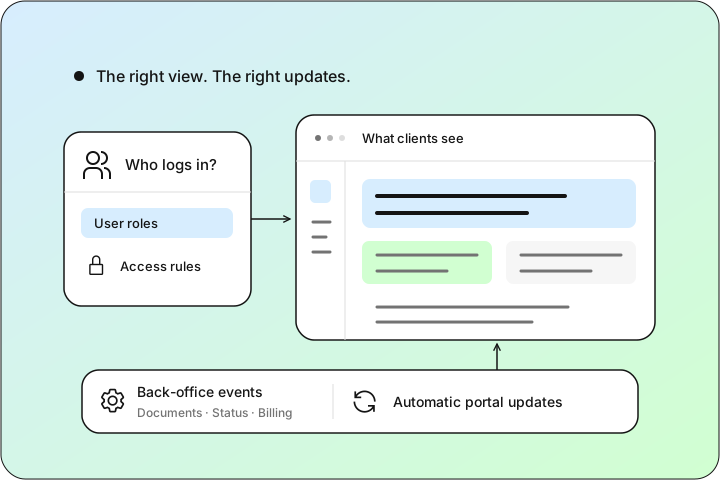
Who logs in, what they need to see, and which back-office events should update the portal automatically.
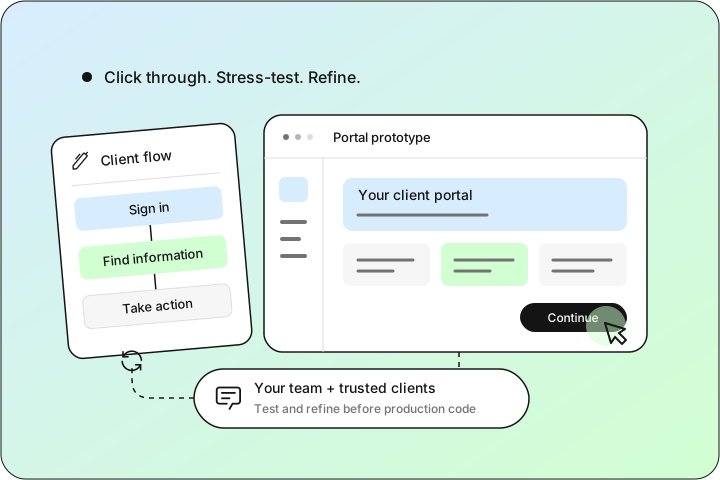
Clickable flows your team and a few trusted clients can stress-test before we commit to production code.
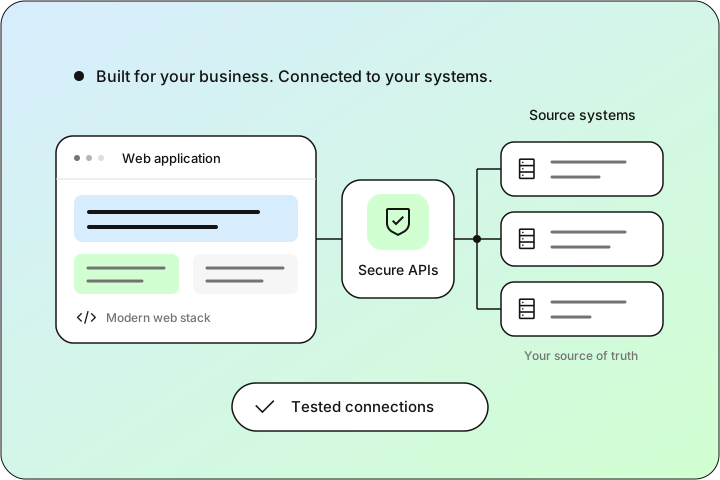
Modern web stack, secure APIs, and tested connections to the systems that hold your source of truth.
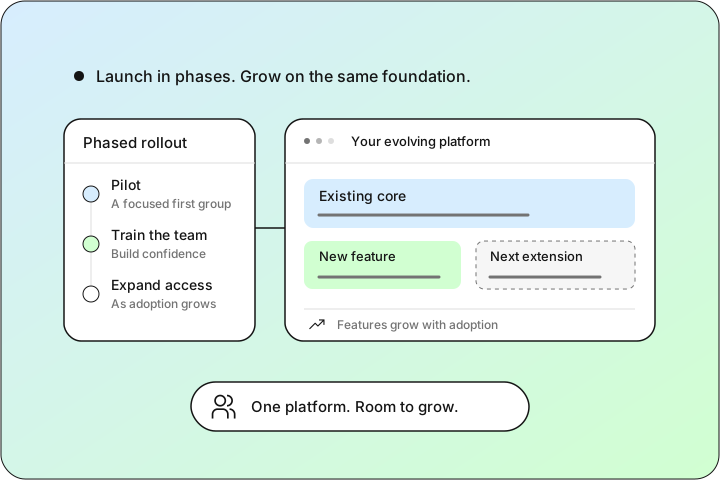
Roll out in phases, train your team, and extend features as adoption grows—without a rip-and-replace.
What you get
Source code, infrastructure, and accounts in your name from launch—grow it with us or take it in-house, with no lock-in either way.
Authentication, permissions, and audit-friendly logging aligned to your industry so each client sees only what they should.
Status, documents, and billing synced from your systems of record, so clients act on current truth—not last week's spreadsheet.
Flows and language that match how you sell and serve—not a generic login widget bolted onto someone else's template.
Start with the journeys that flood your inbox, then add ordering, billing, or booking modules as adoption proves the model.
Tell us who needs access, what they should be able to do, and what systems must stay in sync. We'll reply within one business day.
Let's talk →Answer a few quick things and the right person gets back to you within one business day — with a plan, a fixed quote, or a prototype to click through.
Sign in to your CYBERCUBE client portal to track projects, view live dashboards, and message your team.
Ask about our work, services, or how we'd approach your project.
Hi, I'm Ping — CYBERCUBE's assistant. Tell me what you're trying to build or fix, and I'll point you the right way, or connect you with the team.
Prefer a human? or email [email protected].